Business problem
Most enterprise reporting is hierarchical.
Finance users do not only want to see individual G/L accounts. They want to expand revenue, cost of sales, operating expenses, balance sheet sections and management reporting nodes. Operational teams do not only want to see individual cost centres. They want to navigate regions, business units, departments, plants and responsibility centres.
In SAP BW and SAP S/4HANA, many of these structures are already understood by the business. When organisations move reporting into SAP Datasphere, the expectation is often that those same hierarchies will simply appear and behave in the same way.
That expectation is risky.
SAP Datasphere supports several hierarchy modelling approaches, but they are not interchangeable. A hierarchy strategy that works well for one reporting dimension may be unsuitable for another. A design that is technically possible may still be difficult to maintain, awkward to consume in SAP Analytics Cloud or restrictive when new reporting requirements appear later.
The most common project issues are not caused by a lack of hierarchy functionality. They are caused by choosing the wrong hierarchy type too early, underestimating SAP S/4HANA integration work, or failing to test how the hierarchy behaves once it reaches the Analytic Model and reporting layer.
Why hierarchy design matters
A hierarchy is not just a visual drill-down aid. It becomes part of the semantic contract between the data model and the business user.
A good hierarchy design helps users answer questions such as:
- Which costs roll into this management reporting line?
- Which G/L accounts are included in operating profit?
- Which cost centres belong to a particular region?
- Which reporting node should be used as a filter in SAP Analytics Cloud?
- How should unassigned or unmapped members be handled?
- Should the hierarchy come from SAP S/4HANA or be maintained locally in SAP Datasphere?
A poor hierarchy design creates avoidable friction. Users may see missing nodes, duplicated node names, incorrect ordering, unexplained unassigned members, inconsistent text display or different behaviour between preview, Analytic Models and reporting stories.
For this reason, hierarchy modelling should be treated as an architectural decision, not a small configuration task.
Types of hierarchies in SAP Datasphere
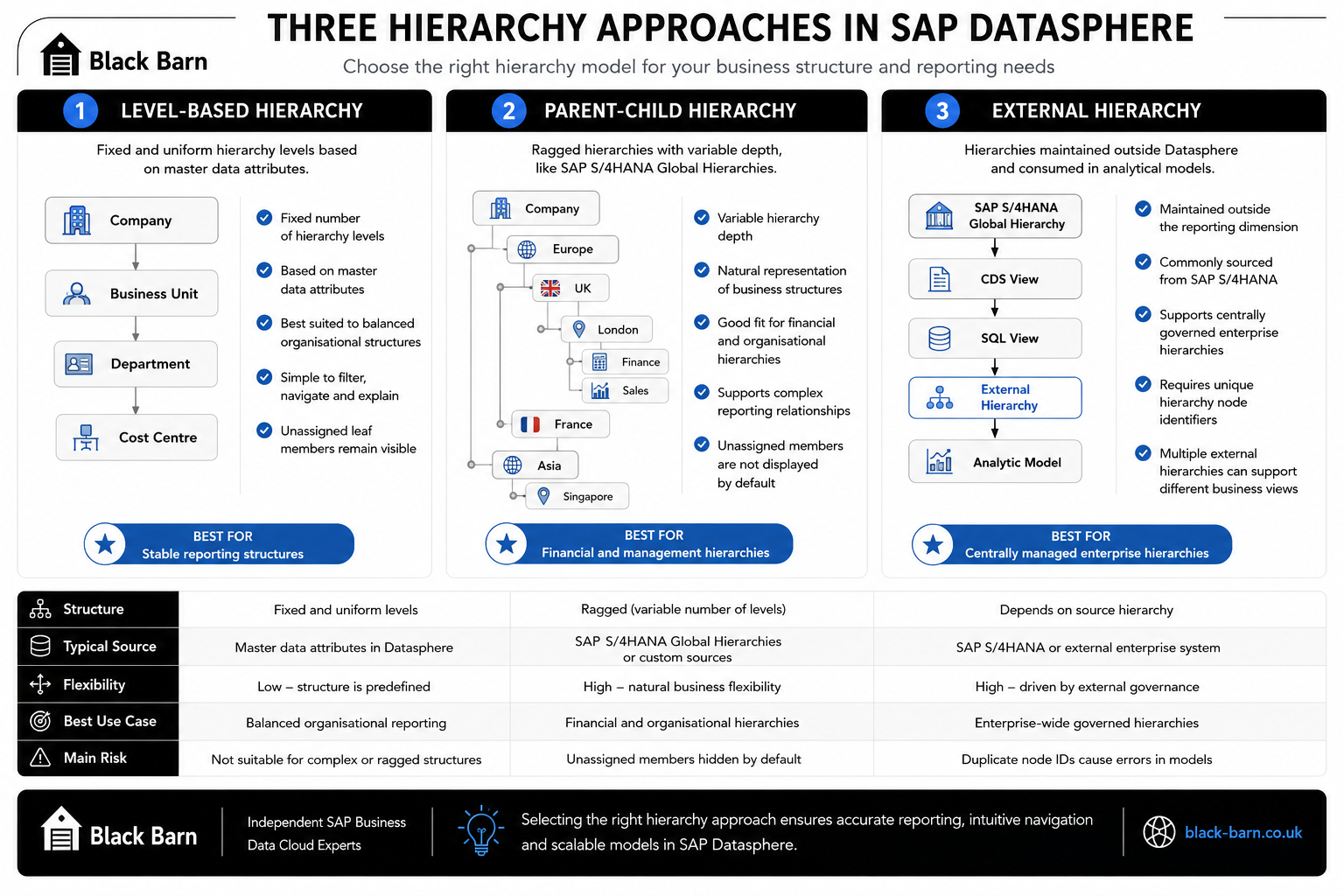
The original presentation identifies two main hierarchy concepts in SAP Datasphere: Level-Based Hierarchies and Parent-Child Hierarchies. Parent-Child structures then appear in two practical flavours: local Parent-Child Hierarchies and External Hierarchies.
For project design purposes, it is useful to think in terms of three implementation options.
Level-Based Hierarchies
A Level-Based Hierarchy has a fixed number of levels. Each level is usually represented by a master data attribute.
A simple cost centre example might contain:
- Company
- Region
- Business Unit
- Department
- Cost Centre
This works well when the organisation has a consistent reporting structure and the business wants predictable navigation levels. It is easy for users to understand because every member moves through the same level sequence.
Level-Based Hierarchies are also useful when reporting teams want hierarchy nodes to behave like normal attributes. For example, a report may need filters for Level 1, Level 2 and Level 3, or a dashboard may need to expose each level as a separate prompt.
The main limitation is flexibility. If one branch has five levels and another branch has eight levels, a Level-Based Hierarchy either becomes awkward or requires artificial padding. It is best suited to balanced structures.
One practical advantage noted in the original presentation is that Level-Based Hierarchies show unassigned leaf nodes. This can be useful in data quality reviews because records that do not yet belong to a valid hierarchy path remain visible to the user.
Parent-Child Hierarchies
A Parent-Child Hierarchy represents relationships through parent and child identifiers. Each node points to its parent. This allows the hierarchy to be ragged, meaning different branches can have different depths.
This is a natural fit for many enterprise structures, particularly financial statement hierarchies, cost centre hierarchies, profit centre hierarchies and SAP S/4HANA Global Hierarchies.
For example, a G/L account hierarchy may have a short branch for cash accounts, a deeper branch for revenue categories and a different depth again for operating expenses. Modelling that as a fixed level structure may force the design into an unnatural shape. Parent-Child modelling preserves the structure more faithfully.
The trade-off is that Parent-Child Hierarchies require more careful design. Node IDs must be reliable, parent-child relationships must be complete, and unassigned members may not behave in the same way as Level-Based Hierarchies. The original Black Barn presentation specifically calls out that Parent-Child Hierarchies do not show unassigned nodes by default.
External Hierarchies
External Hierarchies are a practical way to use hierarchy structures that are maintained outside the reporting dimension. In SAP Datasphere projects, this commonly means bringing SAP S/4HANA hierarchy data into Datasphere and exposing it as an External Hierarchy for use in Analytic Models.
External Hierarchies are particularly useful when the business does not want to recreate or manually maintain hierarchy logic in multiple places. If the finance team maintains G/L Account or Cost Centre Global Hierarchies in SAP S/4HANA, the target architecture should usually preserve that governance model rather than duplicate it.
However, External Hierarchies introduce their own requirements. Node identifiers must be unique. Text handling for hierarchy nodes needs to be designed deliberately. The data pipeline must also preserve parent-child relationships, hierarchy names, sequence information and any attributes required for reporting.
Level-Based vs Parent-Child: the practical difference
The difference between Level-Based and Parent-Child Hierarchies is not simply technical. It affects how the reporting solution will be maintained.
A Level-Based Hierarchy is easiest when the business structure is predictable. It provides stable levels that can be reused in filters, prompts, calculated views and reporting layouts. It is often the better option where the hierarchy is really a set of reporting attributes arranged in order.
A Parent-Child Hierarchy is better when the business structure is naturally ragged. It avoids forcing the model into an artificial number of levels and is usually more aligned with SAP S/4HANA Global Hierarchies.
The decision should be based on the shape of the data, the source of maintenance and the reporting experience required by the end users.
The choice of hierarchy type should consider several important design limitations and implementation considerations before development begins.
The original presentation highlights several limitations that are important in real projects.
The first is that Level-Based and Parent-Child Hierarchies cannot simply be mixed freely on the same dimension. This matters because many customers want both a natural SAP S/4HANA hierarchy and a flattened reporting structure on the same dimension. If that requirement is discovered late, it can force a redesign.
The second is the handling of unassigned members. Level-Based Hierarchies show unassigned leaf nodes. Parent-Child Hierarchies do not show them by default. That difference can create confusion during reconciliation because one hierarchy may expose gaps that another appears to hide.
The third is text display. In External Hierarchy scenarios, it may not be possible to associate a text dimension to a parent node in the same way a modeller might expect from standard dimension modelling. The presentation notes two practical workarounds:
- Use a local dimension-based Parent-Child Hierarchy where this is appropriate.
- Build the External Hierarchy with the description and key available on the same field or structure.
The fourth is node uniqueness. External hierarchy node names or IDs must be unique. If they are not, reporting previews and Analytic Models can fail or produce confusing results.
These are not minor details. They should be tested early with realistic hierarchy data, not discovered during final reporting acceptance.
Integrating SAP S/4HANA Global Hierarchies
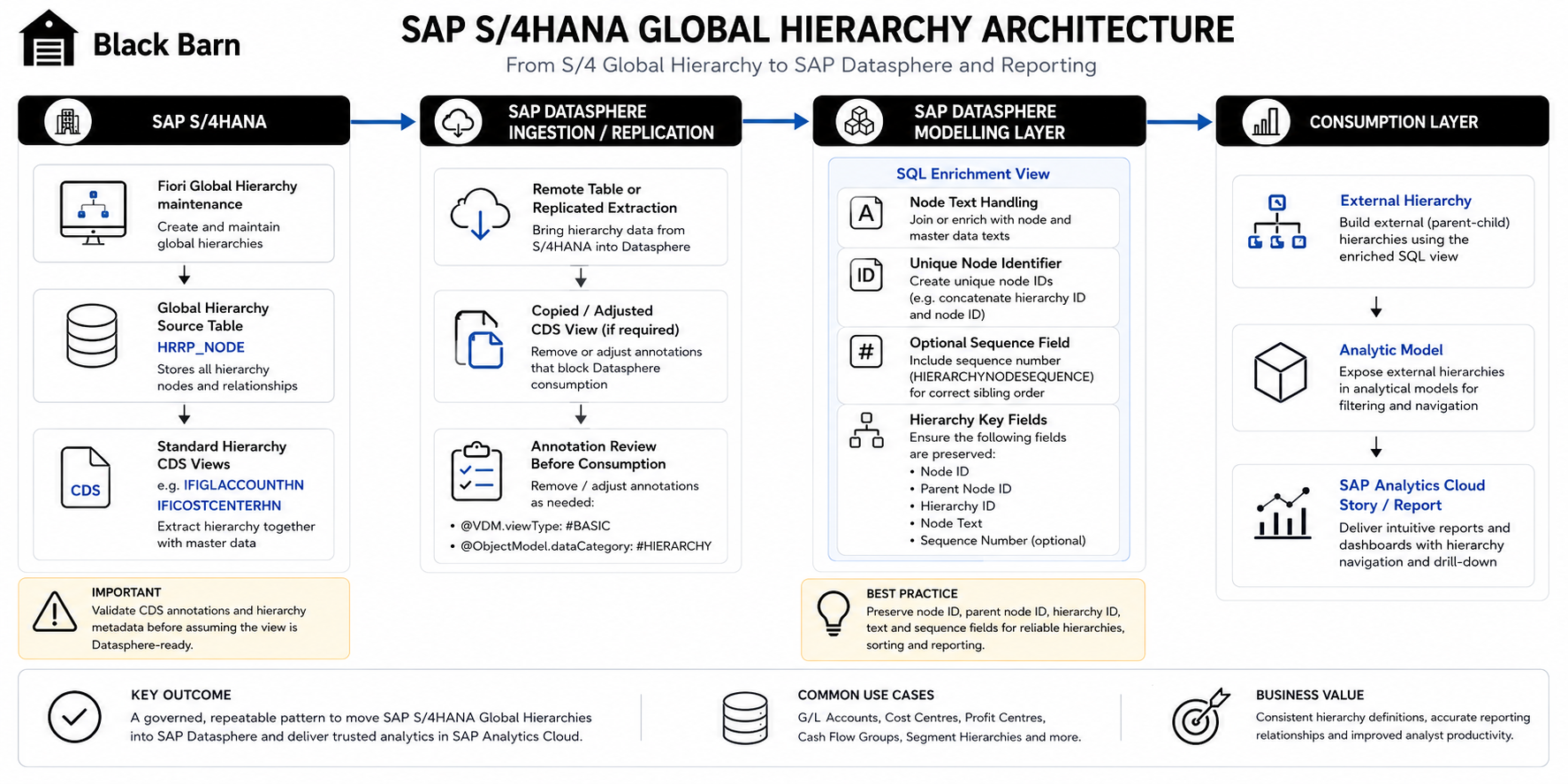
SAP S/4HANA provides Global Hierarchies that can be maintained through Fiori applications. Common examples include G/L Account and Cost Centre hierarchies.
In many organisations, these hierarchies are already part of the financial governance model. The finance team expects reporting tools to consume those hierarchies, not recreate them manually.
SAP provides standard CDS views for hierarchy extraction, but the original Black Barn presentation notes that out-of-the-box integration with SAP Datasphere may require adjustment. A common project pattern is to copy the SAP standard extraction view and remove annotations that cause issues when consumed from Datasphere.
The presentation specifically references annotations such as:
@VDM.viewType: #BASIC
@ObjectModel.dataCategory: #HIERARCHY
The important point is not that every project will remove exactly the same annotations. The important point is that hierarchy extraction views should be validated as part of the integration design. Do not assume that a standard CDS view will immediately produce the correct Datasphere hierarchy structure without modelling work.
The original presentation also notes that Global Hierarchies are read from the SAP S/4HANA table HRRP_NODE and combined with the appropriate master data. Standard CDS views can often be identified by looking for HN in the SQL view name, for example:
IFICOSTCENTERHNfor Cost Centre HierarchiesIFIGLACCOUNTHNfor G/L Account Hierarchies
In a Datasphere implementation, the extracted hierarchy is usually enriched through SQL before being exposed as an External Hierarchy or flattened into Level-Based attributes.
SQL design pattern for External Hierarchies
The SQL layer is where many hierarchy projects succeed or fail.
An External Hierarchy normally needs more than a raw parent-child extract. The view often needs to prepare the data so that SAP Datasphere and downstream reporting tools receive clean, stable and meaningful fields.
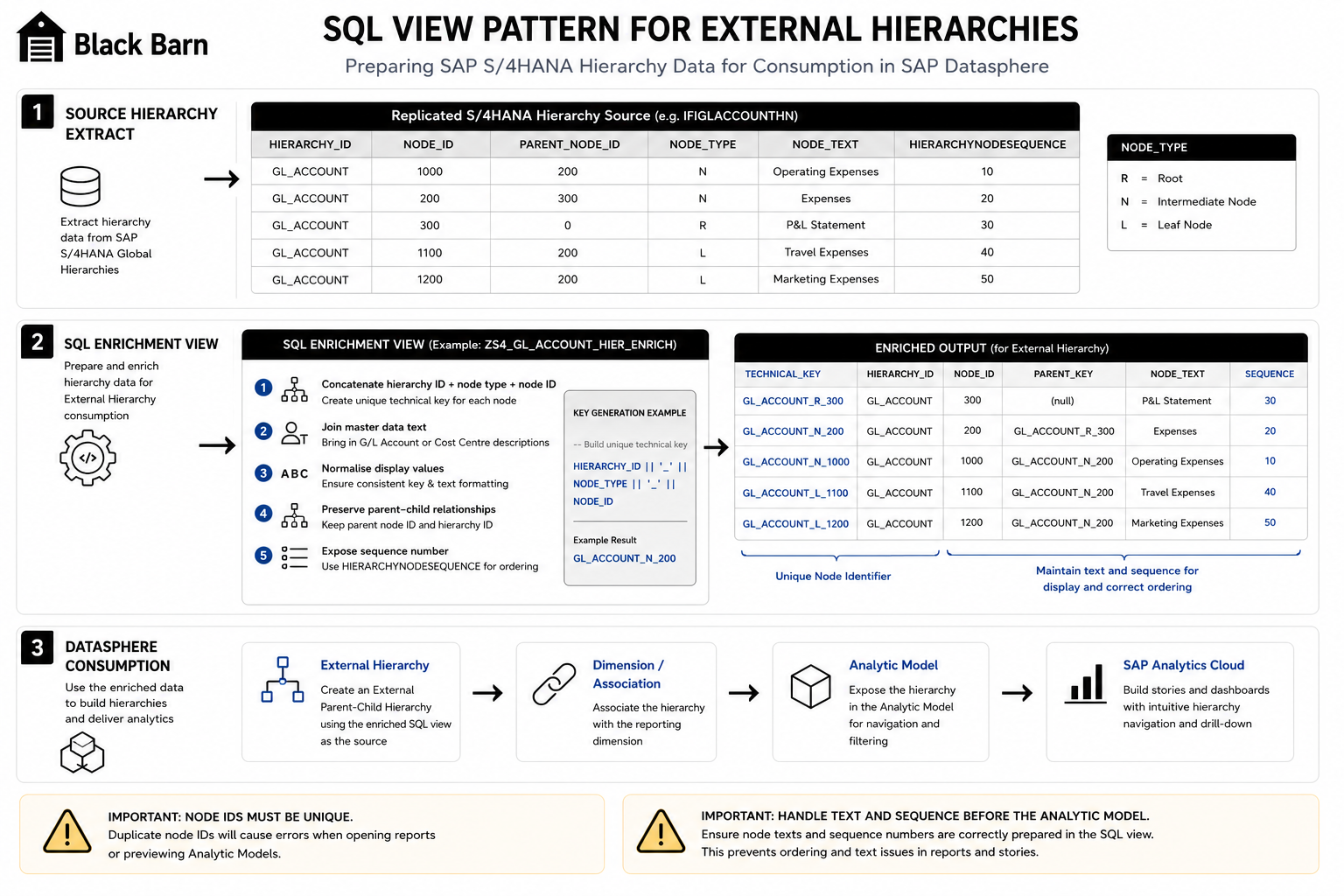
A typical SQL view may need to:
- Read the replicated SAP S/4HANA hierarchy source.
- Create unique node identifiers.
- Preserve parent-child relationships.
- Add hierarchy names or hierarchy IDs.
- Join G/L Account, Cost Centre or other master data text.
- Provide a node description suitable for reporting.
- Include sequence information where sibling ordering must be preserved.
- Remove or normalise leading zeros where business users expect display values without padding.
The original presentation notes two reasons for concatenating fields: node uniqueness and displaying node texts. This is a common real-world requirement. Many S/4HANA hierarchy extracts contain node identifiers that are unique within a hierarchy but not necessarily unique across every reporting scenario. Datasphere models usually need a safer key strategy.
For example, a model may concatenate hierarchy ID, node type and node value to create a stable technical node ID while separately exposing a business-friendly display text.
select
    hierarchy_id,
    concat(hierarchy_id, '_', node_type, '_', node_id) as hierarchy_node_id,
    concat(hierarchy_id, '_', parent_node_type, '_', parent_node_id) as parent_hierarchy_node_id,
    node_id,
    parent_node_id,
    node_text,
    hierarchy_node_sequence
from sv_gl_account_hierarchy_source;
This is deliberately simplified. The actual SQL should be aligned to the source extract, the required hierarchy type and the target Analytic Model. The principle is what matters: do not push raw hierarchy data straight into reporting without first making node identity, text and ordering explicit.
External Hierarchies and reporting dimensions
External Hierarchies can be added to reporting dimensions through association or through the hierarchy dialog. The exact approach depends on the model design and the hierarchy object being consumed.
A useful pattern is to separate the reporting dimension from the hierarchy preparation layer. For example, a G/L Account dimension may provide the account master data, while one or more External Hierarchies provide alternative reporting structures.
This separation is valuable because it allows multiple hierarchies to be associated with the same reporting dimension. A finance team may need a statutory hierarchy, a management reporting hierarchy and a local reporting hierarchy. External Hierarchies can support this pattern more cleanly than trying to overload a single flat attribute structure.
However, this flexibility should not be confused with unlimited mixing of hierarchy types. The original presentation warns that it is not possible to mix Parent-Child External Hierarchies and Level-Based Hierarchies on the same dimension in the way many customers initially expect. That constraint should be validated against the exact reporting requirement.
Converting Parent-Child to Level-Based
Sometimes the business wants the flexibility of a Parent-Child hierarchy at source but the reporting convenience of fixed level attributes in the target model.
This is common in SAP Analytics Cloud reporting. Users may want to filter by Level 1, Level 2 or Level 3. They may also want to use hierarchy node values as standard navigational attributes.
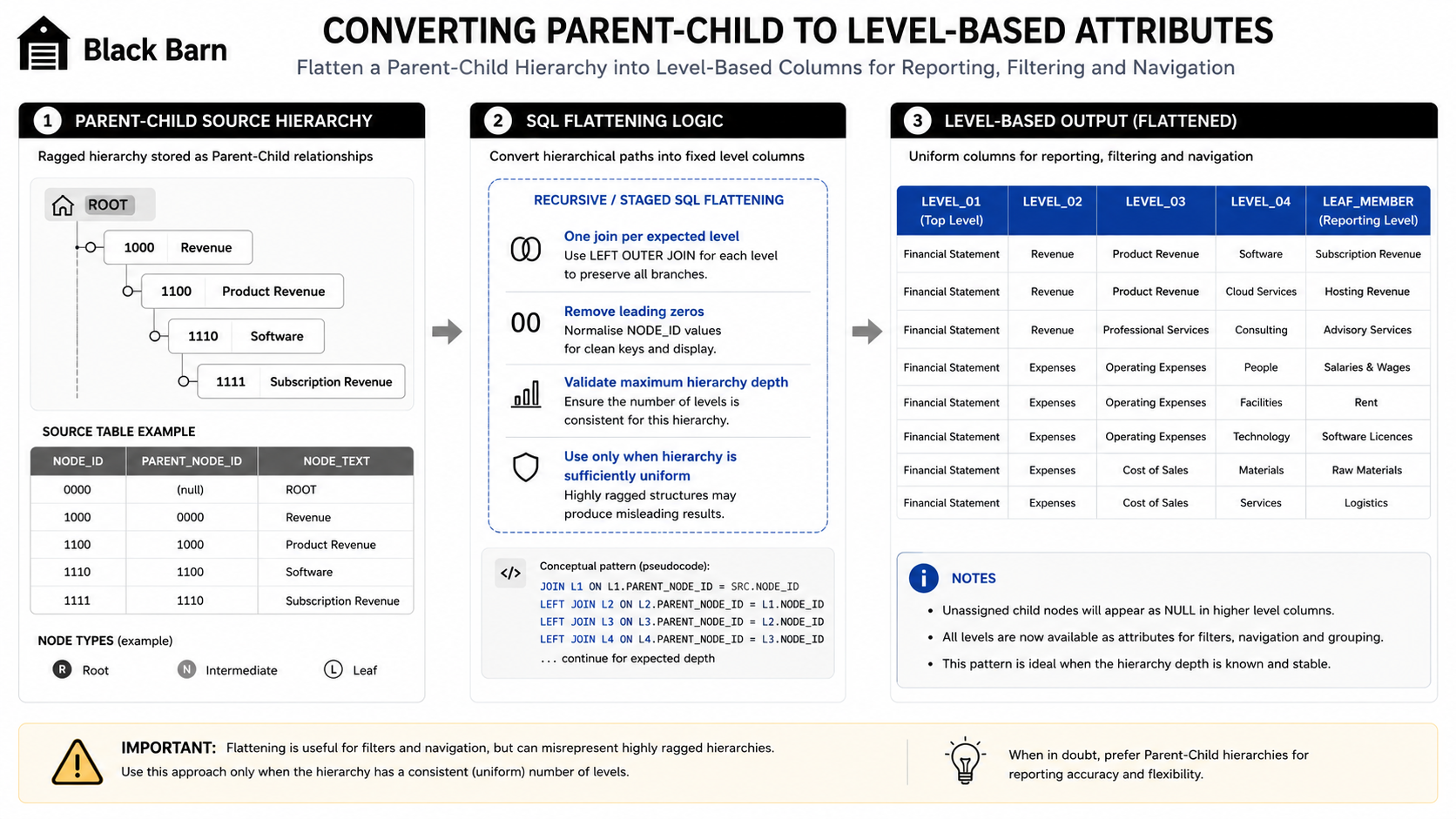
The original presentation describes a practical example where a six-level node hierarchy is flattened into master data attributes. This can work well if the Parent-Child hierarchy has been designed with a consistent number of node levels.
The key phrase is “consistent number of node levels”.
If the source hierarchy is deeply ragged, flattening it may create misleading attributes. If the source hierarchy is mostly uniform, flattening can be a pragmatic solution for dashboard navigation.
A common approach is to use one left outer join per expected node level. The SQL walks the parent-child structure and writes each ancestor node into a separate level column. Additional formatting may be applied, such as removing leading zeros from node IDs for user-friendly display.
This is not always elegant, but it can be effective when the reporting requirement is clear and the hierarchy design is stable.
Preserving hierarchy sibling order
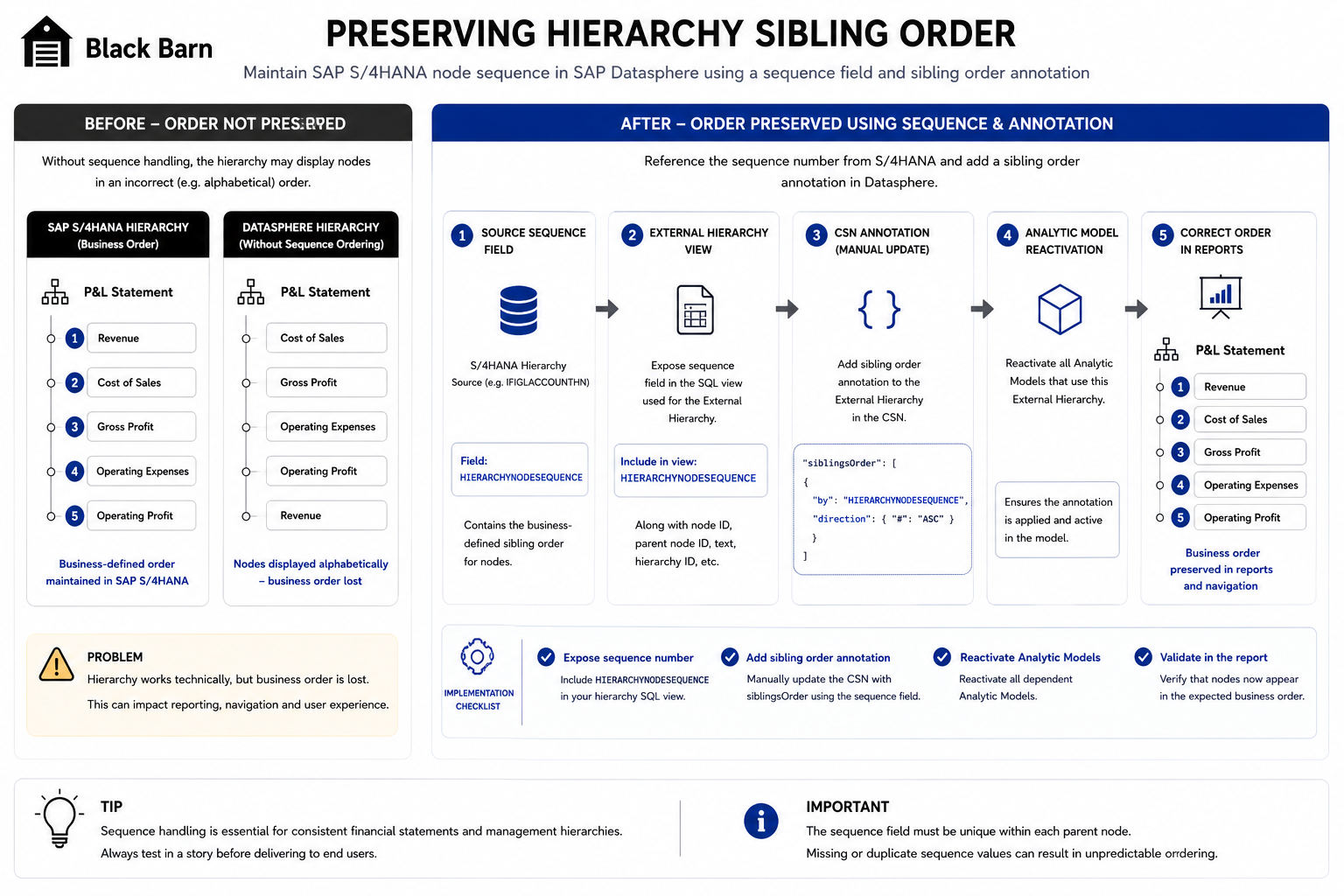
Users often expect the order in SAP Datasphere to match the order they see in SAP S/4HANA. This matters especially in financial reporting, where hierarchy nodes should appear in a business-defined sequence rather than alphabetical or technical key order.
The original presentation includes a specific update on sorting nodes in hierarchies. To preserve the sibling sequence from SAP S/4HANA, the sequence ID from the remote table or CDS view must be exposed and then referenced through the hierarchy annotation.
The presentation provides the following CSN-style example:
"siblingsOrder": [
  {
    "by": "HIERARCHYNODESEQUENCE",
    "direction": {
      "#": "ASC"
    }
  }
]
The practical implementation steps are:
- Ensure the sequence field exists in the External Hierarchy view.
- Confirm the field is populated correctly from the source hierarchy.
- Manually edit the CSN annotation where required.
- Add the sibling order definition.
- Reactivate the Analytic Models that use the hierarchy.
- Re-test the hierarchy output in reporting.
This is an easy area to overlook. A hierarchy may technically work but still feel wrong to finance users if the rows appear in an unexpected order.
Choosing the right hierarchy approach
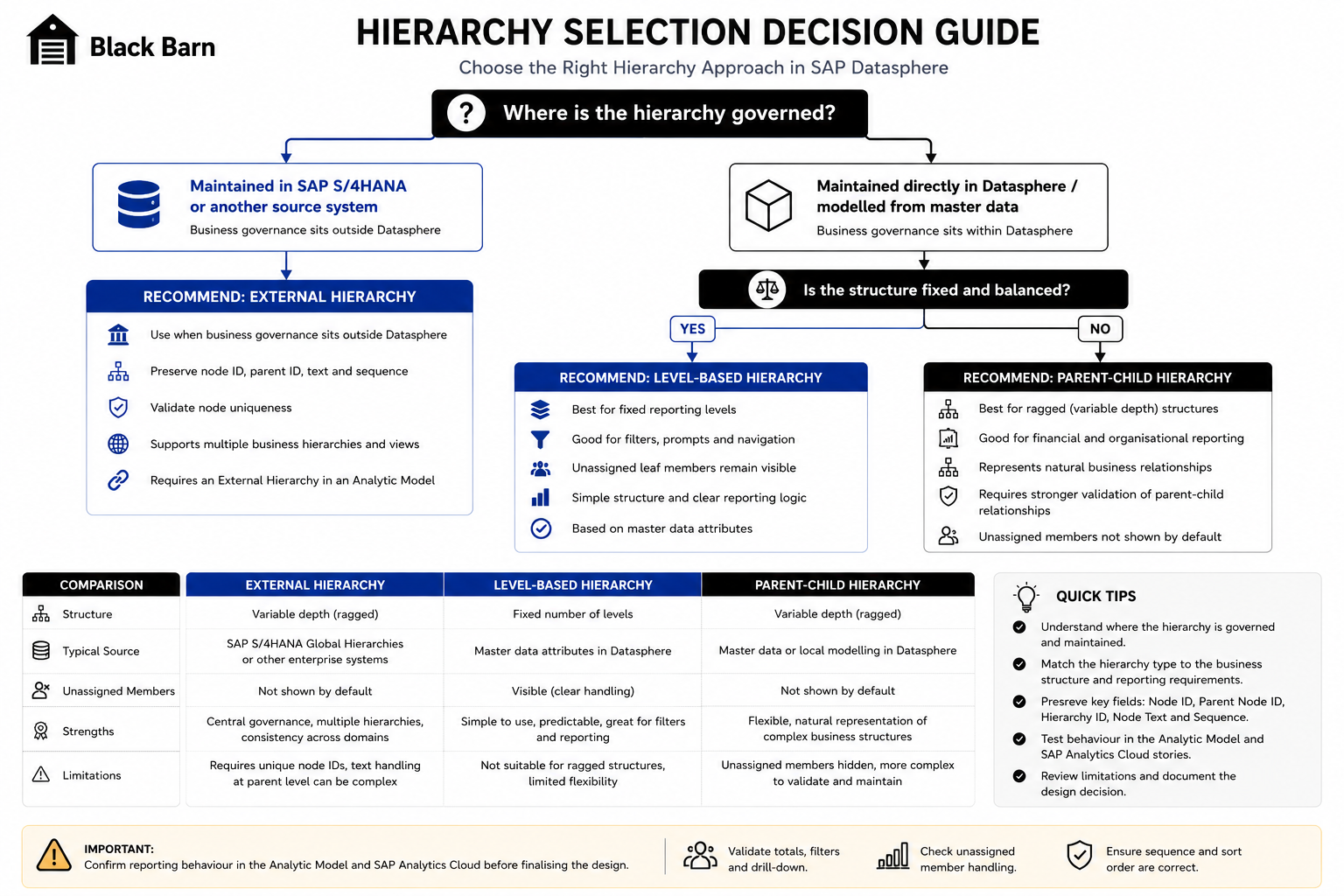
A practical hierarchy decision should start with business usage, not with the available technical options.
Use a Level-Based Hierarchy when:
- the number of reporting levels is stable,
- users need level attributes as filters,
- the structure is easy to explain,
- unassigned leaf members should remain visible,
- and the hierarchy is part of master data modelling rather than centrally governed hierarchy maintenance.
Use a Parent-Child Hierarchy when:
- the structure is naturally ragged,
- branches have different depths,
- the hierarchy represents real business ownership or financial reporting relationships,
- and the source is best expressed as node-to-parent relationships.
Use an External Hierarchy when:
- the hierarchy is maintained outside Datasphere,
- SAP S/4HANA Global Hierarchies are the governing source,
- multiple hierarchy versions may be required,
- the hierarchy needs to be reused across models,
- and governance matters more than local convenience.
Avoid selecting a hierarchy type based only on what is fastest to build in a demo. The better question is: which design will still be maintainable when the business changes the hierarchy next quarter?
Common mistakes
Hierarchy issues often appear late because initial previews look acceptable with small data volumes. The following mistakes are common.
Building before agreeing the reporting behaviour
A technical hierarchy can be created before the reporting requirement is properly understood. This leads to rework when users ask for fixed level filters, multiple hierarchy variants or different unassigned member behaviour.
Ignoring node uniqueness
External Hierarchies require unique node identifiers. If node IDs are only unique within part of the hierarchy, concatenate additional context such as hierarchy ID, node type or source system.
Treating text as an afterthought
Hierarchy node text is part of the user experience. If parent nodes show technical IDs or unexpected concatenations, the hierarchy will be rejected by business users even if the structure is technically correct.
Forgetting sequence order
Financial hierarchies have business order. Always identify whether the source provides a sequence field and whether the reporting layer respects it.
Flattening ragged hierarchies too aggressively
Flattening a Parent-Child hierarchy into levels can be useful, but it can also misrepresent the structure. Only use this approach when the hierarchy depth is predictable enough for the reporting purpose.
Not testing in the final consumption path
A hierarchy should be tested in the dimension, the Analytic Model and the reporting tool. It is not enough to test the SQL output.
Black Barn Recommendation
Start with the business reporting experience and work backwards.
Before building the hierarchy, agree the answers to five questions:
- Where is the hierarchy governed?
- Is the hierarchy fixed-level or naturally ragged?
- Do users need hierarchy levels as filters or prompts?
- How should unassigned members be handled?
- Does the report need to preserve source system node order?
For SAP S/4HANA Global Hierarchies, avoid manually recreating the hierarchy logic in Datasphere unless there is a clear reason. Bring the governed structure across, enrich it through SQL where necessary and validate it early in the Analytic Model.
For local reporting structures, keep the design as simple as possible. If a Level-Based Hierarchy meets the requirement, do not introduce Parent-Child complexity unnecessarily. If the structure is genuinely ragged, do not force it into artificial levels unless the reporting benefit is clear.
Most importantly, prototype with real hierarchy data. Small artificial examples rarely expose the issues that matter: duplicate node IDs, missing text, unassigned members, unusual branch depth and incorrect sibling order.
Conclusion
Hierarchy modelling in SAP Datasphere is not difficult because the concepts are obscure. It is difficult because the same business requirement can often be implemented in several ways, each with different consequences.
Level-Based Hierarchies are simple, clear and useful for fixed reporting structures. Parent-Child Hierarchies represent ragged business structures more naturally. External Hierarchies are essential when SAP S/4HANA or another enterprise system is the governed source.
The right design is the one that matches the shape of the data, the governance model and the reporting experience the business needs.
A well-designed hierarchy makes enterprise reporting feel intuitive. A poorly designed hierarchy creates confusion, reconciliation issues and avoidable redevelopment. Treat hierarchy design as an architectural decision and validate it before the wider model is built around it.
Further Reading
SAP documentation
- SAP Datasphere Documentation
- Add a Hierarchy to a Dimension in SAP Datasphere
- Add an External Hierarchy in SAP Datasphere
- SAP HANA Cloud SQL Reference Guide
SAP Learning and SAP Community
- SAP Learning
- Build an SAP Datasphere parent-child hierarchy based on SAP S/4HANA hierarchies
- An Introduction to Hierarchy with Directory in SAP Datasphere
- Modeling a basic Hierarchy with Directory in SAP Datasphere
- Order siblings in a Hierarchy with Directory with SAP Datasphere
Need expert help with SAP Datasphere or SAP Business Data Cloud?
Black Barn provides independent architecture, implementation, training and advisory services for SAP Datasphere, SAP Analytics Cloud and SAP Business Data Cloud.